


Hominyx: Home Security Camera
4.50.00 Reviews
App Specs
- Version
- 1.7.0
- Updated On
- License
- Free
- Downloads
- 10,000+
- Developer
- HOMINYX LTD
- Categories
- House & Home
- Platform
- Android
Screenshots
 Analysis by AppCompare
I tend to get stuck with phone-camera security apps at the same practical point: the idea sounds simple, but the setup depends on two devices being ready and the camera phone staying useful where I place it. Hominyx: Home Security Camera is built around that phone-to-viewer approach, so I’d think of it as a way to reuse compatible devices for a particular room or short-term need, rather than as a replacement for dedicated home-security equipment.
Where the phone-camera approach can snag
The first decision is which device will remain at home as the camera and which one you’ll carry to check the view. That sounds obvious, but it affects the whole experience: the camera phone needs a stable position, a useful view of the area, and enough power to stay available. Before relying on it, I’d test the arrangement while both devices are nearby instead of discovering a connection problem after leaving.
It also helps to be realistic about what a phone sees. A camera pointed at a doorway may show who enters, while missing activity elsewhere in a room. Reflections, bright windows, and objects that move in the background can make alerts less useful. I’d start with a narrow, meaningful view rather than trying to cover an entire home from one spot.
For a pet check-in, for example, a phone aimed at the part of the room where a cat usually rests can be more helpful than a wide shot of an empty space. If the goal is to watch several rooms or keep equipment running for long stretches, a purpose-built camera system is likely the more sensible choice.
Checks that make setup more dependable
When a camera view does not appear as expected, I’d check the basics before changing everything: both devices should be online, the camera should have power, and the phone should be positioned so its lens is not covered or facing a strong reflection. I’d also confirm that the camera and viewer roles are set on the intended devices. A quick test from the place where I plan to watch is more useful than assuming a nearby setup will behave the same way.
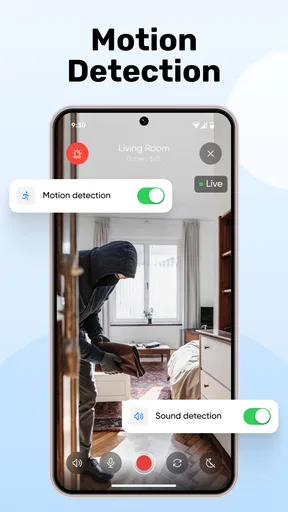
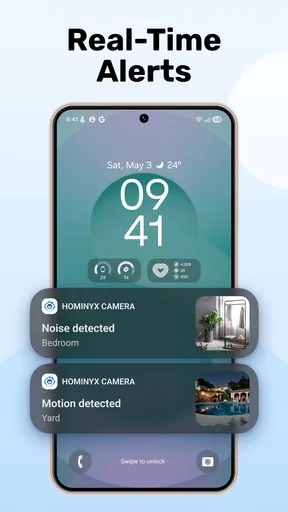
Notifications deserve a separate test. Motion sensitivity is a balancing act: set it too high and normal movement may become distracting; set it too low and a useful event might not trigger an alert. I’d adjust it gradually while observing the actual room, rather than making a large change based on one passing event. A pet moving near the camera can be a good test, but it is not a substitute for checking the view at different times of day.
For a temporary setup, I’d choose a firm surface and keep the phone connected to power. That reduces the chance of the camera shifting or running out of charge during a check. I would not place a device where it could fall, overheat, or be reached by a child or pet. These are simple precautions, but they matter more when an everyday phone is being asked to stay in one place as a camera.
Worth Reading Before You Choose

Flipboard Shows What News Apps Must Do Beyond the Feed

Switching to Android Auto Means Rethinking Your Driving Routine

Google Calendar Makes a Crowded Week Easier to Manage

Ludo King Makes the Most of the Minutes Between Plans

Baby Panda World Brings Quick Play to Modern Phones, but Its Game Library Feels Busy

ESPN’s Live Game View Makes Following Close Games Easier
Recovering the routine when something goes wrong
If viewing stops working, I’d avoid repeatedly changing settings at random. First, check whether the camera phone is still powered and connected; then reopen the app on the viewer and try again. If alerts are the problem rather than the live view, I’d look at the phone’s notification settings as well as the app’s own motion choices. Keeping these checks separate can make it easier to spot whether the issue is the camera setup, the viewer, or simply an alert setting.
For a new location or a different room, I’d run a fresh test after moving the camera. A phone that worked well on a shelf may produce a poor view on a windowsill, and a different background can change how useful motion alerts feel. I’d check both the picture and the alert behavior before treating the new position as ready.
This is also why I would not make a phone-based setup my only way to respond to an urgent security concern. A phone can lose power, connectivity can be interrupted, or the device may be moved for ordinary use. Hominyx can offer a convenient extra view, but it is wiser to treat it as one layer of awareness rather than a guarantee that a home is being monitored continuously.
When the app may not be the cause
Not every disappointing result points to an app problem. A dim room, a camera aimed into a window, a weak connection, or a phone with little battery can all affect the experience. If the image looks unclear, I’d first change the phone’s angle and compare the view in the room’s actual lighting. If the camera disappears, I’d check power and connectivity before rebuilding the setup.
Privacy is another part of choosing a location. I’d avoid pointing a camera at places where household members or visitors reasonably expect privacy, and I’d tell other people in the home when a device is being used as a camera. The app’s security options can help protect access, but careful placement and considerate use are still part of responsible home monitoring.
A practical look at Hominyx
I’d use this section to weigh Hominyx as a focused room-checking tool, not as a promise of uninterrupted home surveillance. The practical question is whether a spare phone can stay powered, well placed, and connected for the moments you care about; that small planning step often matters more than adding another setting.
Setting Up Hominyx: A Breeze
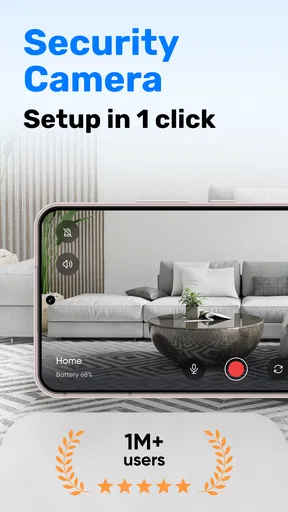
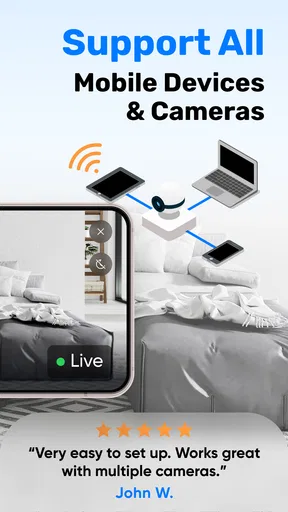
First things first, downloading and setting up Hominyx was a total breeze. You just grab it from the App Store or Google Play and follow the prompts. I was genuinely impressed by how intuitive the whole process was. No need for a tech degree here! The app guides you through linking your devices, so you can have one phone set up as the camera and another as the viewer. Easy peasy!
Features That Stand Out
Now, let's talk features. This app is packed with a bunch of nifty options that make it stand out in the home security game. For starters, it has a motion detection feature. I set it up in my living room, and every time my cat wandered in, I got an alert. You can even adjust the sensitivity, which is great if you don’t want notifications every time a leaf blows past your window.
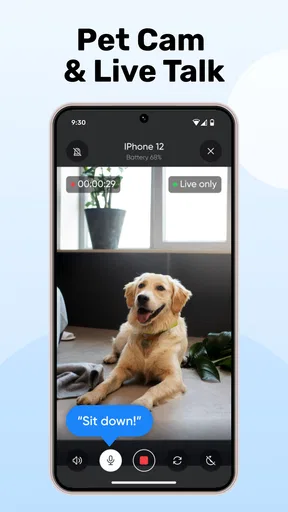
Another cool feature is the two-way audio. Imagine you're at work and you see someone snooping around your front door. With this, you can actually talk to them. "Hey, can I help you?" I've tried it, and it's surprisingly clear!
Video Quality: Surprisingly Good
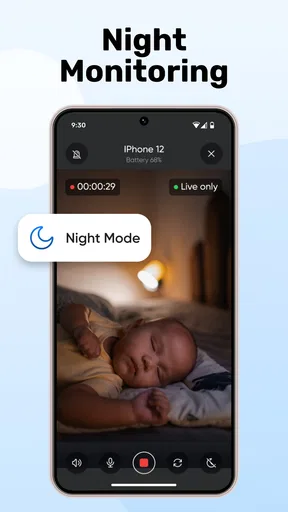
When it comes to video quality, I was pleasantly surprised. The app offers both HD and SD options. Of course, HD is the way to go if you want crystal-clear footage, but it does chew through your data a bit faster. In low light, it does a decent job too. I tested it in the evening, and while it wasn’t perfect, I could still make out details.
Security and Privacy
Security is obviously a big deal when you're dealing with cameras in your home. Hominyx uses encryption to keep your data safe, which is reassuring. Plus, you can lock the app with a PIN or fingerprint, adding an extra layer of security.
One thing to note is that like most apps, it does require some permissions, like access to your camera and microphone. Totally makes sense, but it's always good to be aware of what you're agreeing to.
Usability: User-Friendly Interface
The interface is clean and easy to navigate. Even if you're not super tech-savvy, you’ll find it straightforward. Everything is where you’d expect it to be, and there are helpful hints along the way. The settings menu isn’t cluttered, which I personally appreciate.
Battery and Data Usage
Running a security camera on your phone does drain the battery, so it's best to keep the device plugged in if you're planning on using it for extended periods. As for data, if you're using HD, be prepared for it to use a fair chunk, especially if you check in frequently. But hey, that's the trade-off for better quality, right?
What it suits, and what it doesn’t
I see the strongest fit in temporary or modest setups: checking on a pet while you step out, keeping an eye on a room during a delivery window, or using a spare phone to see whether a child has settled for a nap. In an everyday scenario, I might leave a spare device on a stable shelf facing the living room, confirm the view from the viewer phone before heading out, and use a quick check-in rather than expecting a full home-wide record.
That workflow is convenient because it makes use of devices already at hand. Compared with a dedicated security camera, though, a phone-based arrangement asks you to supply and maintain the camera device yourself. A dedicated camera is usually the better fit for a fixed installation, multiple viewpoints, or ongoing monitoring; Hominyx is more appealing when flexibility and reuse matter more than a permanent setup.
I would skip it if I needed a dependable, always-on system for a large property, or if I had no spare phone to leave in place. I’d also be cautious about using it as the sole way to watch an entrance. It can help me check a space, but it does not remove the practical limits of a phone’s battery, placement, and connection.
Small choices that improve the experience
One useful trade-off is choosing video quality based on the job. If I only need to confirm that a pet is in the room, SD may be a sensible starting point; I’d switch to HD when identifying finer visual detail matters and the connection can handle the extra data use. This is not just a quality setting—it changes how practical frequent remote checks feel, especially away from home.
I’d also think about the phone’s ordinary role before assigning it to camera duty. A spare device is ideal; using the phone you depend on every day can create friction if you need to take it away, answer calls, or use its battery. Before setting up a longer session, I’d make sure the camera phone can remain undisturbed and plugged in, and that its placement still gives a useful view after people move around the room.
For motion alerts, I’d tune the view and sensitivity together. If a window or busy walkway sits in the frame, lowering sensitivity may reduce nuisance alerts, but moving the phone to exclude that background can be a better fix. The non-obvious lesson is that camera placement can matter as much as the alert setting: a cleaner frame can make notifications easier to interpret without making the detector overly restrictive.
How I’d judge the experience before relying on it
I’d run a short, deliberate trial: leave the camera in its intended spot, check the picture from the viewer device, trigger ordinary movement in the area, and see whether the alerts are useful rather than merely frequent. Then I’d repeat the check with the room lighting changed. This gives a more realistic sense of whether the setup suits a daytime pet check or an evening glance, and it helps catch placement problems before they become part of a routine.
People often wonder whether one device is enough. The setup described here uses one phone as the camera and another as the viewer, so I’d plan on having both available for that arrangement. Someone with only one phone should not assume the same workflow will suit them. I’d also ask whether a live view and motion alerts meet the actual need; if the priority is a permanent record or several camera angles, a dedicated system is the more appropriate comparison.
Another practical question is whether this makes sense for a baby or a vulnerable family member. I’d treat it as a supplementary way to check a room, not as a substitute for equipment designed for critical monitoring. A phone app can be useful for casual awareness, but I would not depend on it alone where missed alerts or a lost connection could have serious consequences.
Who is likely to enjoy it
Hominyx is a better match for someone comfortable placing a spare phone in a room and checking its view from another device. It is especially practical for occasional use, such as watching a pet’s usual resting spot or checking whether a room is occupied. Its House & Home category makes sense: the value is less about managing a whole property and more about adding a simple camera view to a particular household routine.
It is free to install, though in-app purchases range from $5.99 to $99.99 per item, so I’d review any purchase details in the app before committing. It has a 4.5 average from 386 ratings and 10K+ installs. HOMINYX LTD is the developer; the app was released on June 23, 2025, and version 1.6.0 supports Android 8.0 and up. Its content rating is Everyone, which is useful context for families, but it does not change the need to place cameras thoughtfully and explain their use to people at home.
Final Thoughts
All in all, Hominyx: Home Security Camera is a solid choice if you're looking to up your home security game without breaking the bank. It’s not going to replace a full-fledged security system, but for something you can set up in minutes with devices you already have, it’s pretty impressive. Whether you're keeping an eye on your pets or just want some peace of mind while you're out, this app gets the job done.
So, if you’re curious, give it a try. It might just be the simple security solution you've been looking for!
My practical verdict
What I like most is the low barrier to trying a phone-based camera setup, along with useful touches such as adjustable motion sensitivity and two-way audio. What gives me pause is the dependence on a second device staying powered, positioned well, and connected. Those are manageable trade-offs for an occasional room check, but they matter if I’m choosing something to watch a home continuously.
Before making it part of my routine, I’d test the camera and viewer together, check the image from the place I’ll actually use it, and see how alerts behave in that room. If those basics work for the specific job, Hominyx can be a handy household extra. If I need continuous coverage, several camera positions, or monitoring I cannot afford to miss, I’d choose dedicated equipment instead.
Pros
- User-friendly interface for easy setup.
- High-definition video quality for clear surveillance.
- Real-time alerts for instant notifications.
- Integration with smart devices enhances functionality.
- Affordable subscription plans for premium features.
Cons
- Occasional connectivity issues with Wi-Fi.
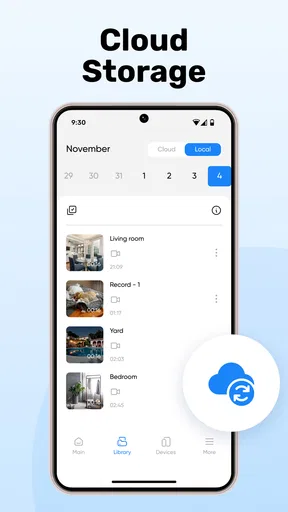
- Limited cloud storage in the free version.
- App can drain phone battery quickly.
- Some features locked behind a paywall.
- Inconsistent motion detection sensitivity.
FAQs for Hominyx: Home Security Camera
What features does Hominyx: Home Security Camera offer?
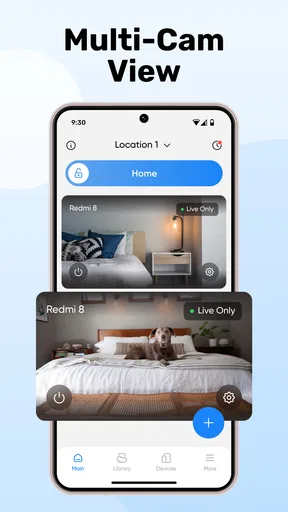
Hominyx provides a range of features including real-time video streaming, motion detection alerts, night vision, and two-way audio. It also supports cloud storage and has an easy-to-use interface that allows users to monitor multiple cameras simultaneously. The app is compatible with both Android and iOS devices, ensuring broad accessibility.
Is Hominyx easy to install and set up?
Yes, Hominyx is designed for user convenience with a straightforward installation process. The app guides you through each step, from connecting your camera to your Wi-Fi network to customizing your settings. Even those without technical expertise can set it up in a matter of minutes, making it user-friendly for all.
How does Hominyx ensure the privacy and security of my data?
Hominyx takes privacy seriously, utilizing end-to-end encryption to protect your video streams and data. The app adheres to strict security protocols, ensuring that only authorized users have access. Regular updates are provided to maintain security standards, protecting against vulnerabilities and potential breaches.
What are the subscription options for Hominyx, and are there any free features?
Hominyx offers both free and premium subscription options. The free version includes basic features such as live streaming and motion alerts. Premium plans unlock additional features like extended cloud storage, advanced motion detection, and priority customer support. Users can choose the plan that best fits their needs and budget.
Can Hominyx integrate with other smart home devices?
Yes, Hominyx supports integration with various smart home ecosystems such as Google Home and Amazon Alexa. This allows users to control their cameras using voice commands and create automated routines. Compatibility with other smart devices enhances the app's functionality, providing a seamless smart home experience.


